
Closed Captions vs Subtitles vs Dubbing Explained

When a video needs to reach more viewers, the first question is often: Should you use closed captions, subtitles, or dubbing? The three options may look similar from a localization perspective, but they solve different problems. Closed captions focus on accessibility and audio information, subtitles primarily help viewers understand dialogue in another language, while dubbing replaces the original spoken audio with a new-language voice track. For broadcasters, OTT platforms, publishers, and media teams, choosing the right format affects accessibility, viewer experience, production effort, localization costs, and delivery requirements. Closed Captions, Subtitles, and Dubbing: What Is the Difference? The easiest way to understand the three formats is to look at what they change and who they are designed to help. Closed captions provide text for spoken dialogue as well as important non-speech audio, such as music, laughter, or meaningful sound effects. They can usually be turned on or off by the viewer. Subtitles primarily present spoken dialogue as text, often translating it into another language for viewers who can hear the original audio but do not understand the language being spoken. Dubbing takes a different approach. Instead of asking viewers to read the translated dialogue, the original spoken track is replaced with a new voice track in the target language. So, the choice is not simply about language. It is about the viewer, content type, accessibility requirement, platform, and desired viewing experience. Echo9’s Post-Dubbing QA Agent watches the full episode, not just a line. See it on your last delivery What Are Closed Captions? Closed captions, commonly written as CC, are timed text that represents the audio information viewers need to understand a video. Unlike dialogue-only subtitles, captions can include: For example: «[APPLAUSE]»«Sarah: We have reached our target.» The first line communicates information that a viewer would otherwise hear but may not be able to access. This makes closed captions particularly important for Deaf and hard-of-hearing viewers. They are also useful when viewers are watching content in environments where audio is difficult to hear. The FCC’s closed-captioning requirements make accessibility an important consideration for media organizations. What Are Subtitles? Subtitles are timed text that primarily communicates spoken dialogue to viewers who may not understand the original language. For example, imagine a documentary recorded in English that is being distributed to Spanish-speaking viewers. The original English audio remains, while Spanish dialogue appears on screen. That is a subtitle workflow. Subtitles generally focus on the spoken message, rather than describing every meaningful sound in the video. This distinction matters because a viewer who can hear the original audio may only need a language translation, while a viewer who cannot hear the audio may need additional information through captions. Subtitles for Global Video Distribution Subtitles are widely used for: They can also be produced in multiple languages without replacing the original performance. For content teams working across many markets, this makes subtitles a practical way to expand language coverage while keeping the original audio intact. What Is Dubbing? Dubbing replaces the original dialogue with a new spoken performance in another language. Instead of reading translated text, the viewer listens to the content in their preferred language. A professional dubbing workflow may involve: High-quality dubbing therefore requires more than translation. The translated dialogue may need to fit the timing of the original scene, match the speaker’s delivery, and work naturally with the visuals. For premium content, lip-sync can add another layer of complexity. When Dubbing Makes More Sense Dubbing can be useful when: Closed Captions vs Subtitles vs Dubbing: Quick Comparison Feature Closed Captions Subtitles Dubbing Main purpose Accessibility Language support Audio localization Dialogue included Yes Yes Replaced with translated dialogue Sound effects included Yes, when meaningful Usually no Original sound mix may remain Original voice Usually remains Remains Replaced Viewer reads text Yes Yes No Useful for accessibility Strong Depends on format Not a replacement for captions Best for Accessibility, broadcast, online video Multilingual audiences Fully localized viewing Production complexity Low to medium Medium Medium to high The important point is that these formats are not interchangeable. A dubbed video can still need captions. A subtitled video can still need an accessibility-focused caption track. A broadcast may require captions even when subtitles are not part of the localization plan. When Should You Use Each Format? Choose Closed Captions When Accessibility Is the Priority Use closed captions when viewers need access to dialogue and meaningful audio information. This is especially relevant for: WCAG 2.2 Success Criterion 1.2.2 requires captions for prerecorded audio content in synchronized media, with defined exceptions. W3C also notes that captions should include dialogue and meaningful non-speech information needed to understand the content. Choose Subtitles When Language Is the Main Barrier Subtitles are usually the better choice when viewers can hear the original audio but need the dialogue translated. They work well for: One source video can therefore be adapted for several markets without creating a completely new audio version for every language. Choose Dubbing When the Viewing Experience Should Feel Fully Localized. Dubbing is worth considering when the audience should be able to watch without reading. It can be especially useful for: Worksheet Free Worksheet Model your real per-episode localization cost. A fillable worksheet that puts studio, vendor and Echo9 costs side by side for one season. Get the Worksheet Conclusion Understanding closed captions vs subtitles vs dubbing is more than learning three definitions. For broadcasters, OTT platforms, and content teams, each format serves a different audience and production goal. Closed captions help make audio content accessible. Subtitles remove language barriers while preserving the original audio. Dubbing creates a more immersive localized experience by replacing the spoken dialogue. The best choice depends on the video’s audience, platform, language requirements, accessibility needs, production timeline, and distribution strategy. For teams producing video at scale, the strongest workflow is one that treats captioning, subtitling, dubbing, timing, terminology, and quality control as connected parts of video localization. When those decisions are made early, content becomes easier to distribute, easier to localize, and more useful
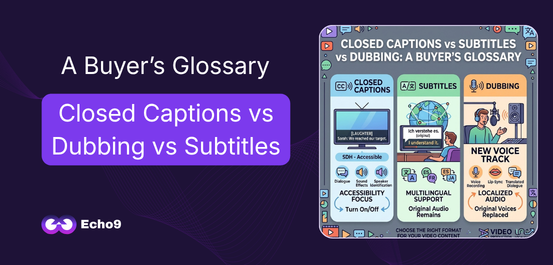
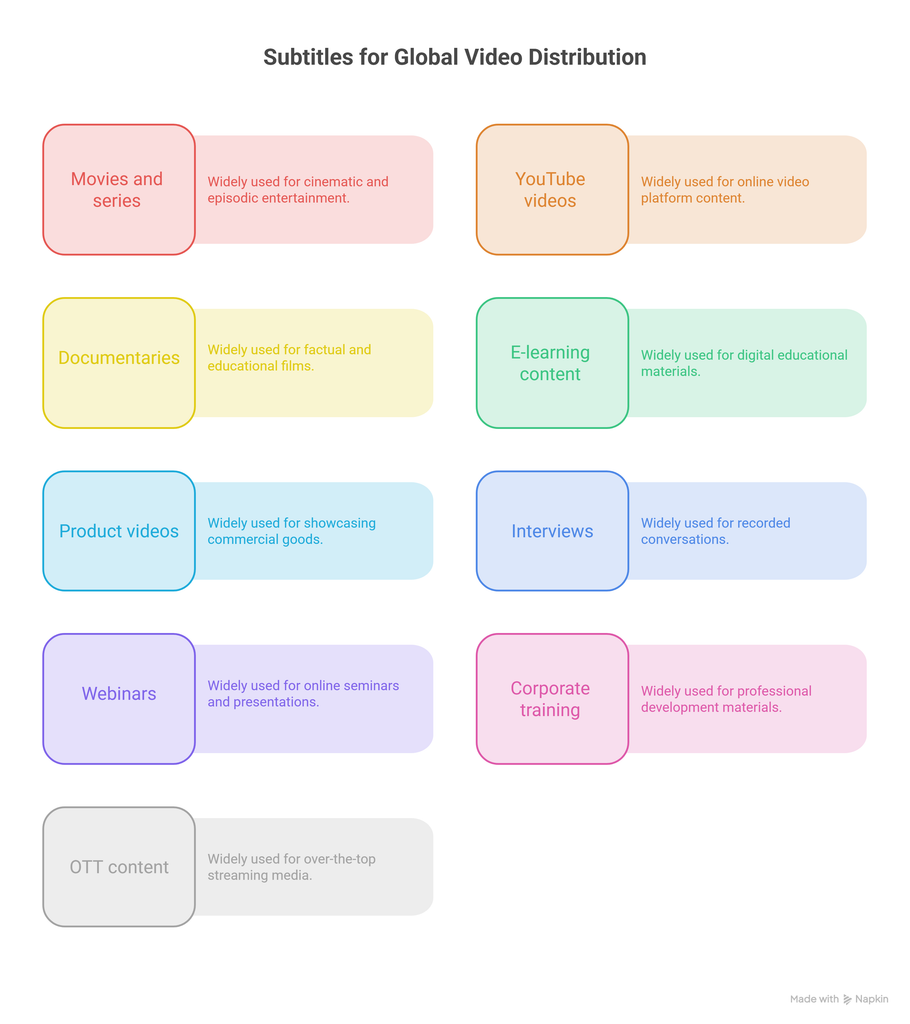
Table of Contents

When a video needs to reach more viewers, the first question is often: Should you use closed captions, subtitles, or dubbing?

The three options may look similar from a localization perspective, but they solve different problems. Closed captions focus on accessibility and audio information, subtitles primarily help viewers understand dialogue in another language, while dubbing replaces the original spoken audio with a new-language voice track.

For broadcasters, OTT platforms, publishers, and media teams, choosing the right format affects accessibility, viewer experience, production effort, localization costs, and delivery requirements.

Closed Captions, Subtitles, and Dubbing: What Is the Difference?

The easiest way to understand the three formats is to look at what they change and who they are designed to help.

Closed captions provide text for spoken dialogue as well as important non-speech audio, such as music, laughter, or meaningful sound effects. They can usually be turned on or off by the viewer.

Subtitles primarily present spoken dialogue as text, often translating it into another language for viewers who can hear the original audio but do not understand the language being spoken.

Dubbing takes a different approach. Instead of asking viewers to read the translated dialogue, the original spoken track is replaced with a new voice track in the target language.

So, the choice is not simply about language. It is about the viewer, content type, accessibility requirement, platform, and desired viewing experience.

Echo9’s Post-Dubbing QA Agent watches the full episode, not just a line.

See it on your last delivery

What Are Closed Captions?

Closed captions, commonly written as CC, are timed text that represents the audio information viewers need to understand a video.

Unlike dialogue-only subtitles, captions can include:

  • Spoken dialogue
  • Speaker identification
  • Important sound effects
  • Music cues
  • Laughter, applause, or other meaningful sounds
  • Other audio information that contributes to the meaning of a scene

For example:

«[APPLAUSE]»
«Sarah: We have reached our target.»

The first line communicates information that a viewer would otherwise hear but may not be able to access.

This makes closed captions particularly important for Deaf and hard-of-hearing viewers. They are also useful when viewers are watching content in environments where audio is difficult to hear.

The FCC’s closed-captioning requirements make accessibility an important consideration for media organizations.

What Are Subtitles?

Subtitles are timed text that primarily communicates spoken dialogue to viewers who may not understand the original language.

For example, imagine a documentary recorded in English that is being distributed to Spanish-speaking viewers. The original English audio remains, while Spanish dialogue appears on screen.

That is a subtitle workflow.

Subtitles generally focus on the spoken message, rather than describing every meaningful sound in the video.

This distinction matters because a viewer who can hear the original audio may only need a language translation, while a viewer who cannot hear the audio may need additional information through captions.

Subtitles for Global Video Distribution

Subtitles are widely used for:

  • Movies and series
  • YouTube videos
  • Documentaries
  • E-learning content
  • Product videos
  • Interviews
  • Webinars
  • Corporate training
  • OTT content

They can also be produced in multiple languages without replacing the original performance.

For content teams working across many markets, this makes subtitles a practical way to expand language coverage while keeping the original audio intact.

Diagram of nine content types that use subtitles, from movies and series to e-learning and OTT streaming.

What Is Dubbing?

Dubbing replaces the original dialogue with a new spoken performance in another language.

Instead of reading translated text, the viewer listens to the content in their preferred language.

A professional dubbing workflow may involve:

  1. Transcribing the original dialogue
  2. Translating and adapting the script
  3. Selecting or generating voices
  4. Recording the target-language dialogue
  5. Timing the new dialogue
  6. Mixing the new audio with music and sound effects
  7. Reviewing the final localized version

High-quality dubbing therefore requires more than translation.

The translated dialogue may need to fit the timing of the original scene, match the speaker’s delivery, and work naturally with the visuals. For premium content, lip-sync can add another layer of complexity.

When Dubbing Makes More Sense

Dubbing can be useful when:

  • The audience prefers listening rather than reading
  • The content is designed for long-form viewing
  • The target market has strong dubbing expectations
  • The video needs a more localized viewing experience
  • Reading subtitles would distract from important visuals

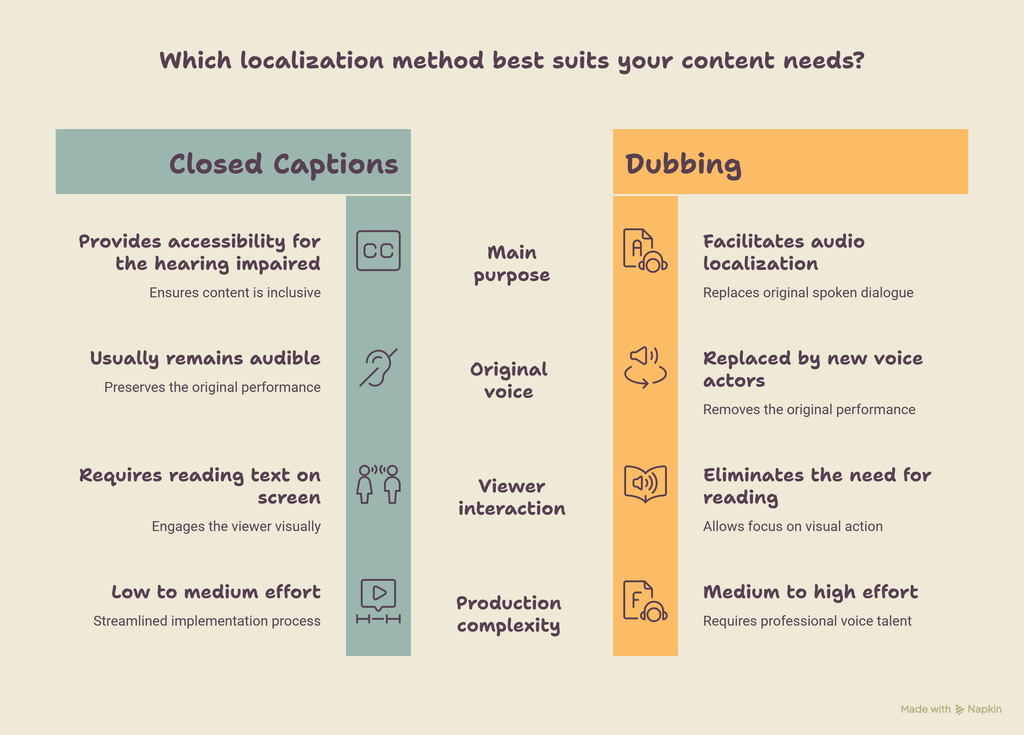
Closed Captions vs Subtitles vs Dubbing: Quick Comparison

FeatureClosed CaptionsSubtitlesDubbing
Main purposeAccessibilityLanguage supportAudio localization
Dialogue includedYesYesReplaced with translated dialogue
Sound effects includedYes, when meaningfulUsually noOriginal sound mix may remain
Original voiceUsually remainsRemainsReplaced
Viewer reads textYesYesNo
Useful for accessibilityStrongDepends on formatNot a replacement for captions
Best forAccessibility, broadcast, online videoMultilingual audiencesFully localized viewing
Production complexityLow to mediumMediumMedium to high

The important point is that these formats are not interchangeable.

A dubbed video can still need captions. A subtitled video can still need an accessibility-focused caption track. A broadcast may require captions even when subtitles are not part of the localization plan.

Chart comparing closed captions and dubbing on purpose, original voice, viewer experience and production effort.

When Should You Use Each Format?

Choose Closed Captions When Accessibility Is the Priority

Use closed captions when viewers need access to dialogue and meaningful audio information.

This is especially relevant for:

  • Broadcast programming
  • News
  • Live events
  • Educational videos
  • Webinars
  • Public information videos
  • Accessibility-focused content

WCAG 2.2 Success Criterion 1.2.2 requires captions for prerecorded audio content in synchronized media, with defined exceptions. W3C also notes that captions should include dialogue and meaningful non-speech information needed to understand the content.

Choose Subtitles When Language Is the Main Barrier

Subtitles are usually the better choice when viewers can hear the original audio but need the dialogue translated.

They work well for:

  • International releases
  • Multilingual marketing videos
  • YouTube content
  • Documentaries
  • Interviews
  • Corporate communications
  • OTT catalogs

One source video can therefore be adapted for several markets without creating a completely new audio version for every language.

Choose Dubbing When the Viewing Experience Should Feel Fully Localized.

Dubbing is worth considering when the audience should be able to watch without reading.

It can be especially useful for:

  • Entertainment
  • Children’s content
  • Premium streaming content
  • Long-form programming
  • Markets where dubbed content is strongly preferred
Free Worksheet

Model your real per-episode localization cost.

A fillable worksheet that puts studio, vendor and Echo9 costs side by side for one season.

Get the Worksheet

Conclusion

Understanding closed captions vs subtitles vs dubbing is more than learning three definitions. For broadcasters, OTT platforms, and content teams, each format serves a different audience and production goal.

Closed captions help make audio content accessible. Subtitles remove language barriers while preserving the original audio. Dubbing creates a more immersive localized experience by replacing the spoken dialogue.

The best choice depends on the video’s audience, platform, language requirements, accessibility needs, production timeline, and distribution strategy.

For teams producing video at scale, the strongest workflow is one that treats captioning, subtitling, dubbing, timing, terminology, and quality control as connected parts of video localization.

When those decisions are made early, content becomes easier to distribute, easier to localize, and more useful to audiences across markets.
FAQs

Are closed captions and subtitles the same thing?

Not exactly. Closed captions are designed to provide access to dialogue and relevant audio information, while subtitles generally focus on communicating spoken dialogue, often through translation. Terminology can vary between countries and platforms, so buyers should always confirm the delivery specification.

Can a video have both subtitles and closed captions?

Yes. A video can have different text tracks for different audiences. For example, one track may provide translated subtitles, while another provides accessibility-focused captions.

Is dubbing better than subtitles?

Neither is universally better. Subtitles preserve the original audio and are generally simpler to produce across many languages. Dubbing creates a more localized listening experience but requires additional voice and audio production.

Do dubbed videos still need captions?

Dubbing does not automatically provide accessibility for viewers who cannot hear the audio. If accessibility is required, an appropriate caption track may still be necessary.

Which is better for news: captions or subtitles?

It depends on the audience and purpose. Broadcast news often requires accurate captioning for accessibility, while subtitles can be added when the same news content is being distributed to audiences who speak another language.

What is the difference between CC and SDH?

Closed captions generally represent dialogue and relevant audio information in the source language. SDH usually combines translated dialogue with accessibility cues for viewers who are Deaf or hard of hearing.

Which subtitle format should a buyer request?

That depends on the platform. SRT is widely supported, while WebVTT is commonly used for web-based video. Always confirm the platform’s required specifications before delivery.

Can AI create captions, subtitles, and dubbing?

AI can assist with transcription, translation, caption generation, voice generation, and other localization tasks. However, quality control remains important, particularly for names, technical terminology, timing, speaker identification, and culturally sensitive content.

Book a Consultation

Bring us your hardest scene.

Send one episode and one target language. We walk you through the output, line by line, with your team on the call.

30 minutes · with an engineer, not a sales pitch

On the call

  • A real scene from your catalogue, dubbed end to end
  • Timing, emotion and lip-sync reviewed against the source
  • Cost and turnaround modelled on your episode volume
  • Your QA checklist, run against the output