Best AI Subtitle Generators in 2027: Ranked and Compared
An AI subtitle generator can turn a 45-minute episode into a timed subtitle file in minutes. That speed is now table stakes. What separates the tools in 2027 is everything that happens after the first draft: how easily you can edit it, whether timing and line length meet broadcast and accessibility rules, and whether the same character names come out the same way in episode one and episode forty. This guide ranks the AI subtitle generators most often shortlisted by media teams and creators this year, including Echo9, VEED, Kapwing, Descript, Maestra, Rev, Happy Scribe, Subtitle Edit, and YouTube’s built-in automatic captions, by what each one is actually built to do. What Makes a Good AI Subtitle Generator in 2027? Speech recognition accuracy has improved enough that most tools land in a similar range on clean, single-speaker audio. The gaps show up with real production content: overlapping dialogue, music beds, accents, technical vocabulary, and long-running series. We ranked each AI subtitle generator against six criteria that matter for an actual buying decision: The Best AI Subtitle Generators Ranked The nine tools below are ranked against the six criteria above, starting with the strongest fit for media teams subtitling at scale and moving toward tools built for individual creators and single videos. Each entry follows the same format: what the tool is, its key features, who it suits best, and where it falls short, so you can compare them side by side and shortlist the ones that match your content type and volume. 1. Echo9: Best for Series, Broadcast, and Multi-Language Catalogs Echo9’s Subtitle Studio is built for teams subtitling ongoing, episodic content in many languages. Instead of translating line by line, it reads the full episode for context first, so subtitles carry the intended meaning rather than a word-for-word swap. 2. VEED: Best for Quick Subtitles Inside a Video Editor VEED is a browser-based video editor with automatic subtitles built in. You can generate, edit, style, and translate subtitles in the same place you trim and brand the video, then burn them in or download them as a file. See Echo9 vs VEED for a side-by-side breakdown. Multi-Language Delivery Scale one episode into your next six markets. Give us one source upload and your target languages. We’ll show you the parallel output. Book a ConsultationStart a Free Trial 3. Kapwing: Best for Short-Form and Social Clips Kapwing is a browser-based editor popular with social media teams. Auto-subtitles sit alongside resizing, clipping, and templates, which makes it quick to turn one video into several captioned social versions. 4. Descript: Best for Podcast and Text-Based Editing Workflows Descript edits audio and video through a transcript: delete a word in the text and it disappears from the recording. Because the transcript is the editing surface, captions come naturally out of the edit. 5. Maestra: Best for Transcription-First Teams Maestra started as a transcription and subtitling tool and has expanded into translation and voice features from that base. Its workflow suits teams whose process begins with an accurate transcript and ends with subtitles in several languages. 6. Rev: Best When You Want an AI or Human Option From One Vendor Rev is well known for transcription and captioning. Its main advantage is choice: an automated draft when speed matters most, or human-produced captions when accuracy has to be guaranteed. 7. Happy Scribe: Best for Multilingual Transcription and Subtitles Happy Scribe focuses on transcription and subtitles across many languages, with an online editor for cleanup. Like Rev, it offers both machine-generated and human-reviewed options. 8. Subtitle Edit: Best Free Desktop Editor for Hands-On Users Subtitle Edit is a free, open-source desktop subtitle editor used by many professional subtitlers. Recent versions can also generate a first draft with open-source speech recognition models, which you then correct by hand. 9. YouTube Automatic Captions: Best Free Starting Point for YouTube-Only Content YouTube generates automatic captions for many uploads at no cost, and creators can edit them in YouTube Studio. Our guide on how to localize YouTube content covers when to go beyond the built-in tools. AI Subtitle Generator Comparison Table Factor Echo9 VEED / Kapwing Descript Maestra / Happy Scribe / Rev Subtitle Edit YouTube Auto Captions Primary focus Series subtitling and dubbing Video editing with subtitles Text-based audio/video editing Transcription and subtitles Manual subtitle editing Platform-native captions Show / season / episode structure Built in No No Varies No No QA and review tracking Built-in QC checks, weighted QA scoring, per-line human sign-off Limited Limited Varies Manual tools No Best for OTT, broadcast, EdTech, LSPs Social and short-form Podcasts, interviews Training, agencies Hands-on editors YouTube-only creators Cost to start Paid plans Free tiers available Free tier available Paid, some free trials Free Free Pricing and free-tier limits change often, so confirm current details with each vendor before you decide. How Echo9 Enriches Subtitles Before Translating Standard machine translation works one line at a time, which is where pronoun mix-ups, broken callback jokes, terminology drift, and tone mismatches creep in. Echo9’s Enrichment Agent builds context across the whole episode before translating: With that context, lines are adapted for the audience rather than the dictionary. An idiom like “driving me up the wall” is carried over as the local expression for frustration, not translated literally. Echo9’s localization engine also accounts for relationships (how a character addresses a parent versus a rival, including honorifics), subtext such as sarcasm and irony, and audience-level vocabulary, so viewers in Lisbon and Sao Paulo each get a natural version of the same line. Quality is then proven, not assumed. An episode is “Ready” once the AI draft exists, and only “Completed” when a reviewer has ticked every line. A built-in QA Logger scores errors by category (diarization and translation 40 points each, timing 15, split and merge 5), and Echo9 reports 98% translation accuracy, independently verified. Finished files export as human-reviewed SRT or VTT, kept separate from AI drafts. See the full workflow on the Echo9 Subtitle Studio page. Accuracy and Accessibility: Why
Table of Contents
An AI subtitle generator can turn a 45-minute episode into a timed subtitle file in minutes. That speed is now table stakes. What separates the tools in 2027 is everything that happens after the first draft: how easily you can edit it, whether timing and line length meet broadcast and accessibility rules, and whether the same character names come out the same way in episode one and episode forty.
This guide ranks the AI subtitle generators most often shortlisted by media teams and creators this year, including Echo9, VEED, Kapwing, Descript, Maestra, Rev, Happy Scribe, Subtitle Edit, and YouTube’s built-in automatic captions, by what each one is actually built to do.
What Makes a Good AI Subtitle Generator in 2027?
Speech recognition accuracy has improved enough that most tools land in a similar range on clean, single-speaker audio. The gaps show up with real production content: overlapping dialogue, music beds, accents, technical vocabulary, and long-running series. We ranked each AI subtitle generator against six criteria that matter for an actual buying decision:
Transcription accuracy on real content. How the tool handles accents, crosstalk, and domain-specific terms, not just a clean demo clip.
Editing experience. Whether fixing a line, splitting a caption, or adjusting timing is fast or tedious.
QA and compliance checks. Whether the tool flags reading-speed, line-length, and timing problems automatically or leaves them to a reviewer.
Translation and multi-language output. Whether subtitles can be translated inside the tool with terminology kept consistent.
Series and catalog support. Whether the tool understands a season or a catalog, or treats every upload as a new, unrelated job.
The Best AI Subtitle Generators Ranked
The nine tools below are ranked against the six criteria above, starting with the strongest fit for media teams subtitling at scale and moving toward tools built for individual creators and single videos. Each entry follows the same format: what the tool is, its key features, who it suits best, and where it falls short, so you can compare them side by side and shortlist the ones that match your content type and volume.
1. Echo9: Best for Series, Broadcast, and Multi-Language Catalogs
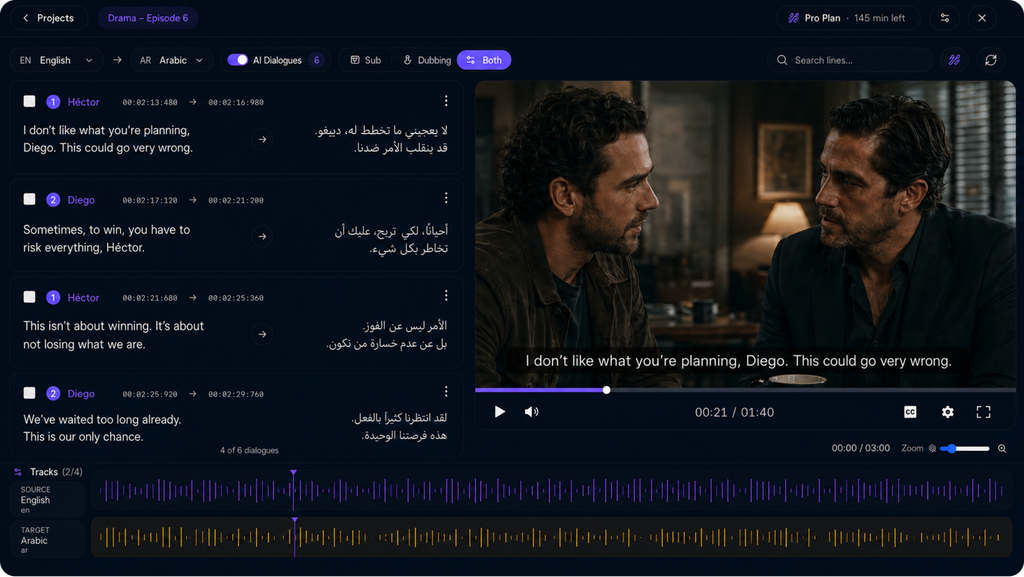
Echo9’s Subtitle Studio is built for teams subtitling ongoing, episodic content in many languages. Instead of translating line by line, it reads the full episode for context first, so subtitles carry the intended meaning rather than a word-for-word swap.
Key features: full-episode context enrichment before translation, every target language from one upload, show/season/episode organization, and per-line human sign-off with weighted QA scoring.
Best for: OTT platforms, broadcasters, LSPs, and EdTech catalogs that need consistent subtitles across a full season.
Limitations: more structure than you need for a single short social clip.
2. VEED: Best for Quick Subtitles Inside a Video Editor
VEED is a browser-based video editor with automatic subtitles built in. You can generate, edit, style, and translate subtitles in the same place you trim and brand the video, then burn them in or download them as a file.
Key features: auto-subtitles, on-screen styling and brand presets, subtitle translation, and general video editing tools.
Best for: creators and marketing teams subtitling individual clips without switching apps.
Limitations: an editor first, so episode-level context, terminology consistency, and structured QA are not its focus.
Kapwing is a browser-based editor popular with social media teams. Auto-subtitles sit alongside resizing, clipping, and templates, which makes it quick to turn one video into several captioned social versions.
Key features: auto-subtitles with styling, subtitle translation, resizing for different platforms, and shared team workspaces.
Best for: burned-in, styled captions on short videos for social channels.
Limitations: less suited to long-form episodes that need sidecar files, delivery specs, and cross-episode consistency.
4. Descript: Best for Podcast and Text-Based Editing Workflows
Descript edits audio and video through a transcript: delete a word in the text and it disappears from the recording. Because the transcript is the editing surface, captions come naturally out of the edit.
Key features: transcript-based editing, automatic transcription, caption export, and collaboration on the same project.
Best for: podcasters and interview-heavy creators who already edit in Descript.
Limitations: built around editing in the source language; catalog-wide terminology and broadcast QA are outside its core focus.
5. Maestra: Best for Transcription-First Teams
Maestra started as a transcription and subtitling tool and has expanded into translation and voice features from that base. Its workflow suits teams whose process begins with an accurate transcript and ends with subtitles in several languages.
Key features: automatic transcription, subtitle generation and translation, an online editor, and voice-over options.
Best for: e-learning, training, and corporate video teams.
Limitations: confirm how it keeps names and terms consistent across a long course or series before committing.
6. Rev: Best When You Want an AI or Human Option From One Vendor
Rev is well known for transcription and captioning. Its main advantage is choice: an automated draft when speed matters most, or human-produced captions when accuracy has to be guaranteed.
Key features: AI transcription and captions, human-made captions and transcripts, and foreign-language subtitles.
Best for: teams that need a human-verified file for some content and a faster AI draft for the rest.
Limitations: a transcription and captioning service rather than an episodic localization workflow.
7. Happy Scribe: Best for Multilingual Transcription and Subtitles
Happy Scribe focuses on transcription and subtitles across many languages, with an online editor for cleanup. Like Rev, it offers both machine-generated and human-reviewed options.
Key features: automatic transcription and subtitles, subtitle translation, an online editor, and human-made services.
Best for: agencies and content teams producing multilingual subtitles for individual projects.
Limitations: organized around projects rather than seasons, so consistency across episodes is up to your team.
8. Subtitle Edit: Best Free Desktop Editor for Hands-On Users
Subtitle Edit is a free, open-source desktop subtitle editor used by many professional subtitlers. Recent versions can also generate a first draft with open-source speech recognition models, which you then correct by hand.
Key features: waveform-based timing, format conversion, spell check and error fixing, and optional speech-recognition drafts.
Best for: experienced subtitlers who want fine control at no cost.
Limitations: a single-user desktop tool, not a team workflow or a managed translation engine.
9. YouTube Automatic Captions: Best Free Starting Point for YouTube-Only Content
YouTube generates automatic captions for many uploads at no cost, and creators can edit them in YouTube Studio. Our guide on how to localize YouTube content covers when to go beyond the built-in tools.
Key features: free automatic captions, editing in YouTube Studio, and caption file uploads in other languages.
Best for: creators publishing only on YouTube.
Limitations: accuracy varies with audio quality, and captions stay tied to YouTube, so teams distributing to OTT, broadcast, or learning platforms usually need a dedicated tool.
AI Subtitle Generator Comparison Table
Factor
Echo9
VEED / Kapwing
Descript
Maestra / Happy Scribe / Rev
Subtitle Edit
YouTube Auto Captions
Primary focus
Series subtitling and dubbing
Video editing with subtitles
Text-based audio/video editing
Transcription and subtitles
Manual subtitle editing
Platform-native captions
Show / season / episode structure
Built in
No
No
Varies
No
No
QA and review tracking
Built-in QC checks, weighted QA scoring, per-line human sign-off
Limited
Limited
Varies
Manual tools
No
Best for
OTT, broadcast, EdTech, LSPs
Social and short-form
Podcasts, interviews
Training, agencies
Hands-on editors
YouTube-only creators
Cost to start
Paid plans
Free tiers available
Free tier available
Paid, some free trials
Free
Free
Pricing and free-tier limits change often, so confirm current details with each vendor before you decide.
How Echo9 Enriches Subtitles Before Translating
Standard machine translation works one line at a time, which is where pronoun mix-ups, broken callback jokes, terminology drift, and tone mismatches creep in. Echo9’s Enrichment Agent builds context across the whole episode before translating:
Full transcript ingestion: the entire episode’s dialogue is read, not just the current line or scene.
Scene and speaker metadata: who is speaking, to whom, and in what scene is tracked before translation starts.
Character and relationship mapping: carried forward from earlier episodes in the series.
Terminology memory: a running glossary of names, in-world terms, and phrases, checked against every prior episode.
Consistency flagging: contradictions or drift are flagged for human review instead of slipping through.
With that context, lines are adapted for the audience rather than the dictionary. An idiom like “driving me up the wall” is carried over as the local expression for frustration, not translated literally. Echo9’s localization engine also accounts for relationships (how a character addresses a parent versus a rival, including honorifics), subtext such as sarcasm and irony, and audience-level vocabulary, so viewers in Lisbon and Sao Paulo each get a natural version of the same line.
Quality is then proven, not assumed. An episode is “Ready” once the AI draft exists, and only “Completed” when a reviewer has ticked every line. A built-in QA Logger scores errors by category (diarization and translation 40 points each, timing 15, split and merge 5), and Echo9 reports 98% translation accuracy, independently verified. Finished files export as human-reviewed SRT or VTT, kept separate from AI drafts.
Accuracy and Accessibility: Why Subtitle Quality Is Not Optional
Fast output is only useful if the captions meet the standard your distribution requires. In the U.S., the FCC adopted caption quality standards for television in 2014 covering accuracy, synchronicity, completeness, and on-screen placement, and it has since sought public comment on live captioning quality and the use of automated speech recognition, as listed on the FCC’s closed captioning of video programming on television page.
For web and learning content, the W3C’s Web Accessibility Initiative publishes practical guidance on captions, subtitles, transcripts, and audio description in its Making Audio and Video Media Accessible resource. If you are unsure whether you need captions, subtitles, or a dubbed track, our buyer’s glossary of closed captions vs subtitles vs dubbing explains the difference.
Where Other Subtitle Tools Still Win
A series-focused platform is not the right answer for every job. If you publish one short clip a week to social media, a browser editor like VEED or Kapwing will get styled, burned-in captions out faster with less setup. If your team edits podcasts by transcript, Descript keeps everything in one place. If you are an experienced subtitler who wants fine manual control at no cost, Subtitle Edit is hard to beat. The trade-off appears when one video becomes a catalog, and consistency and QA start to cost more time than generation itself.
How to Choose the Right AI Subtitle Generator
Solo creators and social teams: Start with an editor that has built-in subtitles and styling.
Podcast and interview producers: A transcript-first editor keeps subtitles in the same workflow as your edit.
E-learning and training teams: Prioritize multi-language output and consistent technical terms across a course library.
OTT platforms and broadcasters: Prioritize series-wide terminology control, built-in QA, and delivery-ready formats.
Teams that also dub: Choose a platform where subtitles and dubbing share one glossary, so on-screen text and audio never disagree. Our review of 10 video translation tools covers the dubbing and translation side.
Rephrase-Fit Engine
Test the Rephrase-Fit Engine on your toughest scene.
Send us the scene where lip-sync always breaks. We’ll show you it fixed, with no speed change.
It depends on the job. Echo9 is built for series, broadcast, and multi-language catalogs that need multi-language output in one pass, built-in QA, and human sign-off on every line. VEED and Kapwing are faster for short social clips, Descript suits transcript-based editing, and transcription-first tools like Maestra, Rev, and Happy Scribe fit training and agency work.
How accurate are AI subtitle generators?
Accuracy is high on clean, single-speaker audio and drops with crosstalk, music, heavy accents, and specialist vocabulary. For broadcast or accessibility-critical content, plan for a human review pass on every file, supported by QA checks that flag likely errors.
Is there a free AI subtitle generator?
Yes. YouTube automatic captions are free for YouTube uploads, Subtitle Edit is a free open-source desktop editor, and several browser editors offer free tiers with limits on length, exports, or watermarks. Free tools work well for occasional content but rarely include team QA or series-level consistency.
What subtitle formats should an AI subtitle generator export?
At minimum SRT and VTT, since most web players and platforms accept them. OTT and broadcast delivery often requires additional formats defined in each platform’s delivery specification, so check those requirements before choosing a tool.
Can an AI subtitle generator translate subtitles into other languages?
Many can. The bigger question is consistency: whether names and key terms stay the same across every episode and language. Tools with a locked glossary or terminology control handle this automatically instead of relying on reviewers to catch drift.
Do AI-generated captions meet FCC and WCAG requirements?
They can, but not automatically. FCC standards for U.S. television cover accuracy, synchronicity, completeness, and placement, and WCAG expects captions for prerecorded video on the web. AI output usually needs review and QA to meet those bars reliably.
What is the difference between an AI subtitle generator and a subtitle editor?
A generator creates timed subtitles from speech automatically. An editor is where you correct text, split lines, and adjust timing. Most modern tools combine both, but the quality of the editing and QA layer is what decides how much review time you save.