How to Build a Video Localization Workflow for Your Team
Video content is no longer limited to one language or one market. Creators, educators, brands, and media teams now reach audiences in many countries, and a clear video localization workflow is what makes that growth manageable. But localizing a video is more than translating its dialogue. A complete video localization process can include transcription, translation, subtitles, dubbing, cultural adaptation, quality checks, and final delivery. Without a clear workflow, these tasks quickly become difficult to manage. Files get mixed up, terminology changes between videos, reviews take longer, and teams spend more time fixing mistakes than creating new content. This guide walks through the localization workflow steps your team needs, from planning to delivery, so you can build a process that is simple to start and easy to scale. What Is a Video Localization Workflow? A video localization workflow is the step-by-step process a team follows to adapt video content for a new language, culture, or market. It usually covers planning, transcription, translation and adaptation, subtitles or dubbing, quality review, and delivery, repeated consistently for every video. The exact steps depend on the content. A YouTube creator may only need subtitles and translated titles and descriptions, while an edtech company may need subtitles and dubbing across several languages. Either way, the goal is the same: a process that is clear, repeatable, and easy to manage. Why Your Team Needs a Localization Workflow Without a structured workflow, localization becomes a collection of disconnected tasks. One person handles translation, another manages dubbing, and a third reviews subtitles. If they don’t share the same guidelines, inconsistencies appear. This is a common problem even for experienced localization teams. Text content often moves through mature systems with translation memory, glossaries, and QA gates. Video, however, is frequently handled outside that system, with separate vendors, unfamiliar file formats, and timelines that don’t align with anything else. A proper workflow brings video into the same organized process as the rest of your global content. A good workflow helps your team keep files organized, reduce repeated work, track progress, make reviews easier, and maintain quality across every language. Step 1: Define Your Goals and Your Team Before starting, decide why you are localizing. Ask yourself: Next, decide who owns each stage. Most teams need: On a small team, one person may hold several roles. What matters is that every stage has a clear owner and a clear handoff to the next person. Step 2: Choose Your Target Languages and Markets Do not choose languages just because they are popular. Look at where your existing viewers are, which markets fit your business goals, and what your budget allows. Start small. Pick one or two languages and localize your highest-performing content first. Once the workflow runs smoothly, add more languages and more videos. This lets you fix process problems early, when they are cheap to fix. Each language also brings its own requirements: Making these decisions at the start prevents costly rework later. Step 3: Prepare Your Content and Language Assets Give your team everything they need before work begins: Then build your language assets. These are what make a localization process repeatable: For episodic content, these assets matter even more. Echo9 is built around treating series as connected content rather than separate files, so decisions made in episode one carry forward to episode forty. Step 4: Choose Your Level of Localization Not every video needs the same treatment. The right level depends on your content, audience, budget, and timeline. Echo9’s guide to subtitling vs dubbing covers the trade-offs in detail. Level What’s included Best for Subtitles only Translated on-screen dialogue Broad reach, tight budgets, informational content Subtitles + on-screen text Subtitles plus localized titles, graphics, and captions Marketing videos, tutorials, courses Voice-over Translated narration over reduced original audio Documentaries, interviews, training Full dubbing with lip-sync Replaced dialogue matched to mouth movement Drama, children’s content, entertainment Many teams combine levels, using subtitles for broad global distribution and reserving dubbing for priority markets where deeper engagement matters most. Also consider accessibility. Subtitles for the deaf and hard of hearing (SDH) include sound cues and speaker labels, and many platforms and clients require them. Free Trial Run one episode through the full pipeline. All eight stages on your own content — upload to broadcast-ready audio. No credit card, no managed-service queue. Start a Free TrialBook a Consultation Step 5: Transcribe, Translate, and Adapt Every localization starts with an accurate transcript, because errors here repeat in every language. AI speech recognition makes transcription fast, but a quick human check is worth it, especially for names and technical terms. Next comes translation and adaptation. A word-for-word translation may be grammatically correct but still sound unnatural. Good localization considers context, tone, humor, cultural references, and character personality. A joke that works in English may need to be rewritten so the same feeling lands with the new audience. Names, places, and brand references may also need adjusting so they are recognizable to local viewers. Don’t forget on-screen text. Titles, captions, signs, and graphics need localizing too, and they are among the most commonly missed items. For subtitles, follow readability standards: keep lines short, respect reading speed, and make sure each subtitle stays on screen long enough to read. Public references like the Netflix Timed Text Style Guide are a useful benchmark. Step 6: Add Voice and Timing For dubbing, teams need to consider character voice, tone, emotion, speaking speed, pauses, and lip-sync. Voice consistency is especially important for series. If a character sounds different in every episode, audiences notice quickly. This is where AI video localization adds the most value at scale. Using Echo9, one studio ran a 40-episode drama in four languages and kept its lead character’s voice consistent from the first episode to the last. Translated lines also need to fit the original timing. Because some languages run longer or shorter than the source, lines often need to be rephrased so they match the speaker’s pace and mouth movements without losing meaning. If you use
Table of Contents
Video content is no longer limited to one language or one market. Creators, educators, brands, and media teams now reach audiences in many countries, and a clear video localization workflow is what makes that growth manageable. But localizing a video is more than translating its dialogue.
A complete video localization process can include transcription, translation, subtitles, dubbing, cultural adaptation, quality checks, and final delivery. Without a clear workflow, these tasks quickly become difficult to manage. Files get mixed up, terminology changes between videos, reviews take longer, and teams spend more time fixing mistakes than creating new content.
This guide walks through the localization workflow steps your team needs, from planning to delivery, so you can build a process that is simple to start and easy to scale.
What Is a Video Localization Workflow?
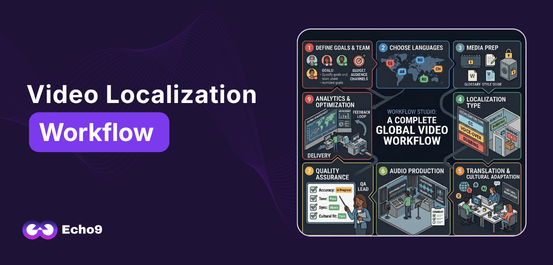
A video localization workflow is the step-by-step process a team follows to adapt video content for a new language, culture, or market. It usually covers planning, transcription, translation and adaptation, subtitles or dubbing, quality review, and delivery, repeated consistently for every video.
The exact steps depend on the content. A YouTube creator may only need subtitles and translated titles and descriptions, while an edtech company may need subtitles and dubbing across several languages. Either way, the goal is the same: a process that is clear, repeatable, and easy to manage.
Why Your Team Needs a Localization Workflow
Without a structured workflow, localization becomes a collection of disconnected tasks. One person handles translation, another manages dubbing, and a third reviews subtitles. If they don’t share the same guidelines, inconsistencies appear.
This is a common problem even for experienced localization teams. Text content often moves through mature systems with translation memory, glossaries, and QA gates. Video, however, is frequently handled outside that system, with separate vendors, unfamiliar file formats, and timelines that don’t align with anything else. A proper workflow brings video into the same organized process as the rest of your global content.
A good workflow helps your team keep files organized, reduce repeated work, track progress, make reviews easier, and maintain quality across every language.
Step 1: Define Your Goals and Your Team
Before starting, decide why you are localizing. Ask yourself:
Which audience are you trying to reach?
Do you want more viewers, customers, or students?
Do you need subtitles, dubbing, or both?
How many videos need to be localized, and by when?
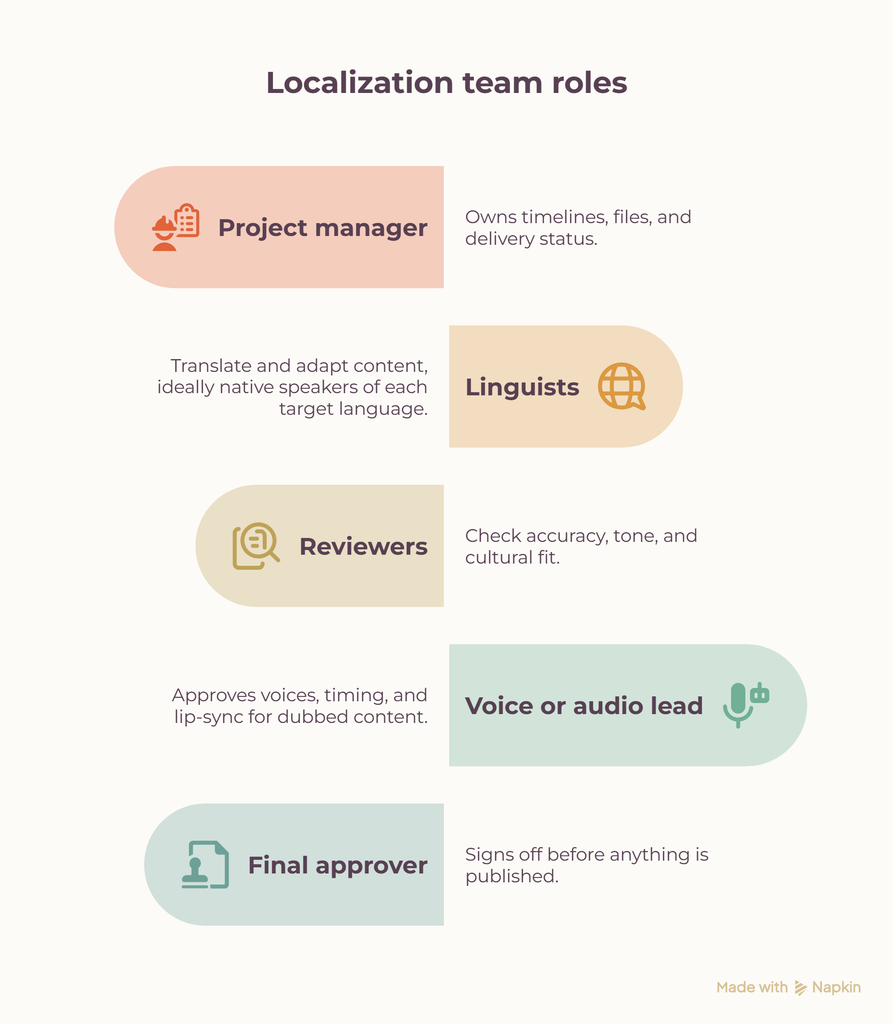
Next, decide who owns each stage. Most teams need:
Project manager: owns timelines, files, and delivery status.
Linguists: translate and adapt content, ideally native speakers of each target language.
Reviewers: check accuracy, tone, and cultural fit.
Voice or audio lead: approves voices, timing, and lip-sync for dubbed content.
Final approver: signs off before anything is published.
On a small team, one person may hold several roles. What matters is that every stage has a clear owner and a clear handoff to the next person.
Step 2: Choose Your Target Languages and Markets
Do not choose languages just because they are popular. Look at where your existing viewers are, which markets fit your business goals, and what your budget allows.
Start small. Pick one or two languages and localize your highest-performing content first. Once the workflow runs smoothly, add more languages and more videos. This lets you fix process problems early, when they are cheap to fix.
Each language also brings its own requirements:
Spanish: decide early between Latin American and Castilian Spanish, because vocabulary and voice casting differ.
Arabic: subtitles run right to left, and you must choose between Modern Standard Arabic and a regional dialect depending on your audience.
Russian: translated text often runs longer than English, which affects subtitle length and dub timing.
Chinese: choose Simplified or Traditional characters based on the market, and adjust subtitle character limits accordingly.
Making these decisions at the start prevents costly rework later.
Step 3: Prepare Your Content and Language Assets
Give your team everything they need before work begins:
The final locked video
The original script, if available
Separate dialogue and music-and-effects (M&E) audio tracks, which dubbing depends on
Character or speaker details
Brand and style guidelines
Then build your language assets. These are what make a localization process repeatable:
Glossary: character names, product names, technical terms, and recurring phrases, with the approved translation for each language.
Style guide: tone, formality level, and how to handle humor, slang, and cultural references.
Translation memory: a growing database of previously approved translations. Every time a line or phrase repeats, your team reuses the approved version instead of translating it again.
For episodic content, these assets matter even more. Echo9 is built around treating series as connected content rather than separate files, so decisions made in episode one carry forward to episode forty.
Step 4: Choose Your Level of Localization
Not every video needs the same treatment. The right level depends on your content, audience, budget, and timeline. Echo9’s guide to subtitling vs dubbing covers the trade-offs in detail.
Level
What’s included
Best for
Subtitles only
Translated on-screen dialogue
Broad reach, tight budgets, informational content
Subtitles + on-screen text
Subtitles plus localized titles, graphics, and captions
Marketing videos, tutorials, courses
Voice-over
Translated narration over reduced original audio
Documentaries, interviews, training
Full dubbing with lip-sync
Replaced dialogue matched to mouth movement
Drama, children’s content, entertainment
Many teams combine levels, using subtitles for broad global distribution and reserving dubbing for priority markets where deeper engagement matters most.
Also consider accessibility. Subtitles for the deaf and hard of hearing (SDH) include sound cues and speaker labels, and many platforms and clients require them.
Free Trial
Run one episode through the full pipeline.
All eight stages on your own content — upload to broadcast-ready audio. No credit card, no managed-service queue.
Every localization starts with an accurate transcript, because errors here repeat in every language. AI speech recognition makes transcription fast, but a quick human check is worth it, especially for names and technical terms.
Next comes translation and adaptation. A word-for-word translation may be grammatically correct but still sound unnatural. Good localization considers context, tone, humor, cultural references, and character personality. A joke that works in English may need to be rewritten so the same feeling lands with the new audience. Names, places, and brand references may also need adjusting so they are recognizable to local viewers.
Don’t forget on-screen text. Titles, captions, signs, and graphics need localizing too, and they are among the most commonly missed items.
For subtitles, follow readability standards: keep lines short, respect reading speed, and make sure each subtitle stays on screen long enough to read. Public references like the Netflix Timed Text Style Guide are a useful benchmark.
Step 6: Add Voice and Timing
For dubbing, teams need to consider character voice, tone, emotion, speaking speed, pauses, and lip-sync. Voice consistency is especially important for series. If a character sounds different in every episode, audiences notice quickly.
This is where AI video localization adds the most value at scale. Using Echo9, one studio ran a 40-episode drama in four languages and kept its lead character’s voice consistent from the first episode to the last.
Translated lines also need to fit the original timing. Because some languages run longer or shorter than the source, lines often need to be rephrased so they match the speaker’s pace and mouth movements without losing meaning.
If you use voice cloning, confirm consent and usage rights with voice talent before production begins. This protects your team and your brand.
Step 7: Build QA Into Every Stage
Never treat the first AI or translation output as final, and don’t leave quality checks until the end. One of the most important video localization best practices is reviewing at each stage:
After transcription: accuracy and missing dialogue
After translation: terminology, grammar, and cultural fit
After subtitling: timing and readability
After dubbing: pronunciation, emotional delivery, lip-sync, and audio quality
Automated QA can flag possible issues quickly, so human reviewers can focus on judgment and context. This hybrid approach is faster than fully manual review and far safer than AI alone.
Step 8: Export and Deliver
Before delivery, confirm that the correct language is selected, subtitles are timed, audio is synced, and all revisions are complete. Deliver in the format each platform needs; Echo9, for example, supports exporting subtitles in SRT and VTT formats.
Use clear file names and track which version is approved so an old file is never delivered by mistake.
Step 9: Measure and Improve
Localization doesn’t end at delivery. Track watch time, engagement, and completion rates in each new market, and measure by language, not just overall. A strong total can hide one language that is underperforming because of a translation or voice issue.
Track internal metrics too: revision rounds, turnaround time, and cost per minute. Feed what you learn back into your glossary, style guide, and translation memory, so every new video starts from a stronger base.
Worksheet
Free Worksheet
Model your real per-episode localization cost.
A fillable worksheet that puts studio, vendor and Echo9 costs side by side for one season.
How Echo9 Simplifies the Video Localization Process
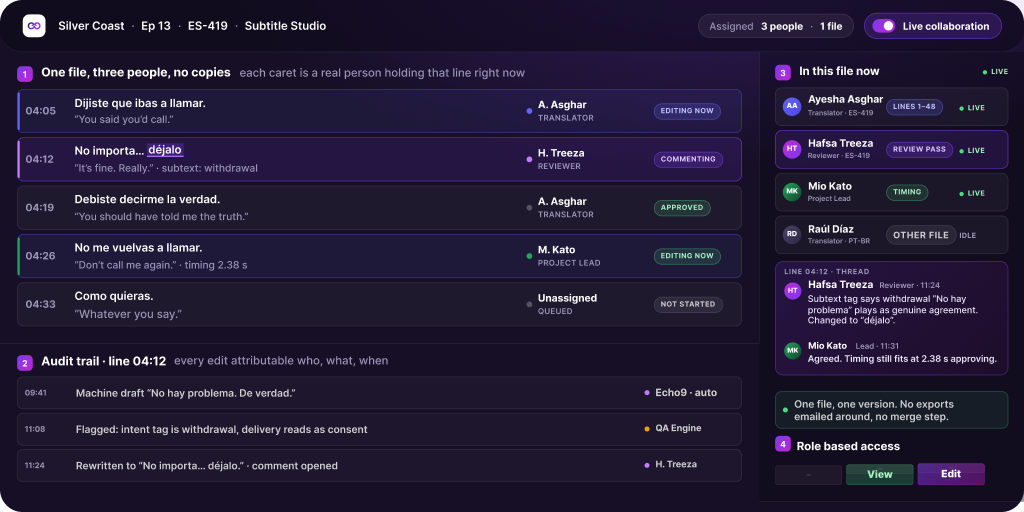
Echo9 brings the major localization stages into one workflow: project setup, upload, context analysis, subtitles, dubbing, timing and lip-sync, human review, QA, and delivery.
Its Series Management approach lets teams organize content by show, season, and episode, so terminology, character voices, and standards carry forward automatically. For a closer look at cost and speed, see traditional dubbing vs AI.
Teams that prefer not to run the process themselves can use Echo9 Managed Services, where in-house native linguists review every line before anything is marked complete. Echo9 also offers dedicated workflows for TV broadcasters, edtech platforms, and news teams.
A Simple Workflow to Follow
For single videos: Plan → Prepare → Transcribe → Translate & Adapt → Subtitle/Dub → Review → QA → Deliver → Measure
For large or episodic projects: Project setup → Upload → Context analysis → Subtitles/Dubbing → Timing & Lip-sync → Human review → QA → Export & Delivery → Measure
Conclusion
Building a video localization workflow does not have to be complicated. Define your goals, assign clear roles, start small, prepare your language assets, choose the right level of localization, review at every stage, and measure results by language. What works for one video may not work for 50 videos or an entire season, so build a process that grows with your content.
FAQs
What is the first step in video localization?
Define your goals: your audience, markets, languages, content type, and who on your team owns each stage.
Should I use subtitles or dubbing?
Subtitles are affordable and fast, while dubbing offers a more immersive experience. Many teams combine both and dub only their priority markets.
Is AI enough for video localization?
AI speeds up transcription, translation, and dubbing, but human review is still essential for cultural context, emotion, and final quality.
How long does video localization take?
It depends on the number of videos, target languages, and whether you need subtitles, dubbing, or both. A clear workflow with reusable language assets shortens turnaround with every new project.
What is translation memory in video localization?
It is a database of previously approved translations. Teams reuse it across videos and episodes to save time and keep wording consistent.
How can teams keep multiple videos consistent?
Use a shared glossary, a style guide, translation memory, consistent voice profiles, and centralized review. For series, manage every episode as one connected workflow.
Multi-Language Delivery
Scale one episode into your next six markets.
Give us one source upload and your target languages. We’ll show you the parallel output.